Also on this page: Frame Number Display Color Guide, Frequently Asked Questions.
Hitbox / Hurtbox color guide
Short Guide
(click on property description to jump to full explanation section.)
| Hurtboxes | |
| Color | Property |
| Light Green | Normal Hurtbox |
| Blue shaded | Hurtbox with Projectile Invincibility. |
| Dark Green Outline | Hurtbox with Air Invincibility. |
| White Outline | Hurtbox with Grounded Strike
Invincibility. (Vulnerable to air strikes) |
| White outline, white shaded. | Hurtbox with Strike Invincibility. (Vulnerable to projectiles) |
| No Hurtboxes at all | Complete Invincibility. |
| Combination Boxes | Multiple properties. |
| Hitboxes | Color | Property |
| Red | Regular Hitbox. |
| Dark Pink / Light Red Border, shaded Dark Pink / Light Red | Combo onlly Hitbox. |
| Pink | Throw Hitbox. |
| Special Boxes | |
| Purple | Armor / Counter Hitbox. |
| Grey | Proximity Block. |
| LIght Orange | Projectile Clash boxes. |
Long Guide with Examples
Every site may use a different color for different hitbox / hurtbox properties. The following colors are for this site only.Examples used are frames captured during August 2025.
❖ ❖ ❖
Shaded blue: Projectile invulnerable hurtboxes
(飛び道具無敵 / 弾無敵)
- These cannot be damaged by hitbox of a projectile (eg: Shoto's Hadoken. Guile's Sonic Boom)- Commonly found in special moves across the cast.
- Examples: Deejay's Juggling Dash, Lower and leg hurtboxes of Ryu's Lk Tatsu, shown below.
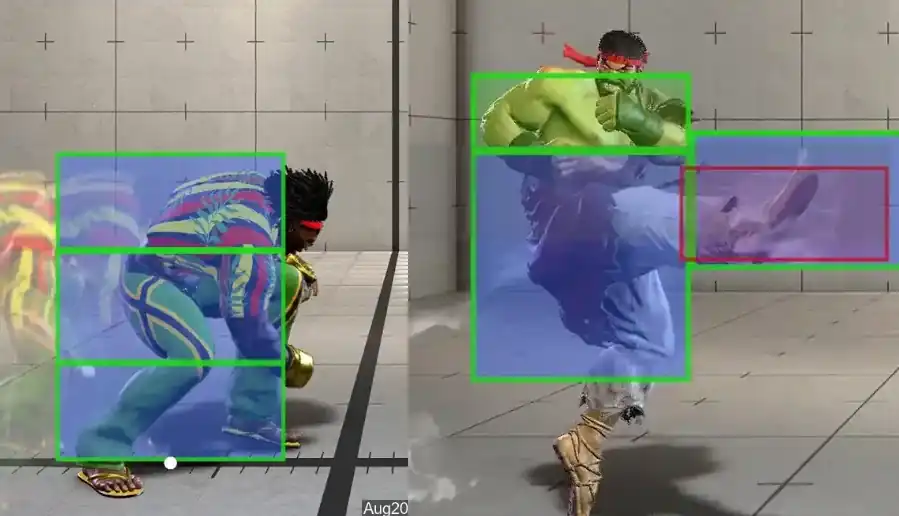
- Also found on lower hurtboxes of jump buttons (except lights), making it easier to jump attack an opponent in the process of throwing a fireball.
❖ ❖ ❖
Dark green outline: Air strike invulnerable hurtboxes.
(対空無敵 / 對空無敵)
- These cannot be damaged by air strikes (eg: jump normals).- Almost all special moves designed to anti air has several frames of complete air invuln, like Ken's Shoryuken and Guile Flashkicks.
- Some characters also have normals with air strike invuln hurtboxes to be used for anti airing.
- Examples: Upper hurtbox of Juri's crouching heavy punch, full body air invuln hurtboxes on Ryu's lp Shoryuken, shown below.
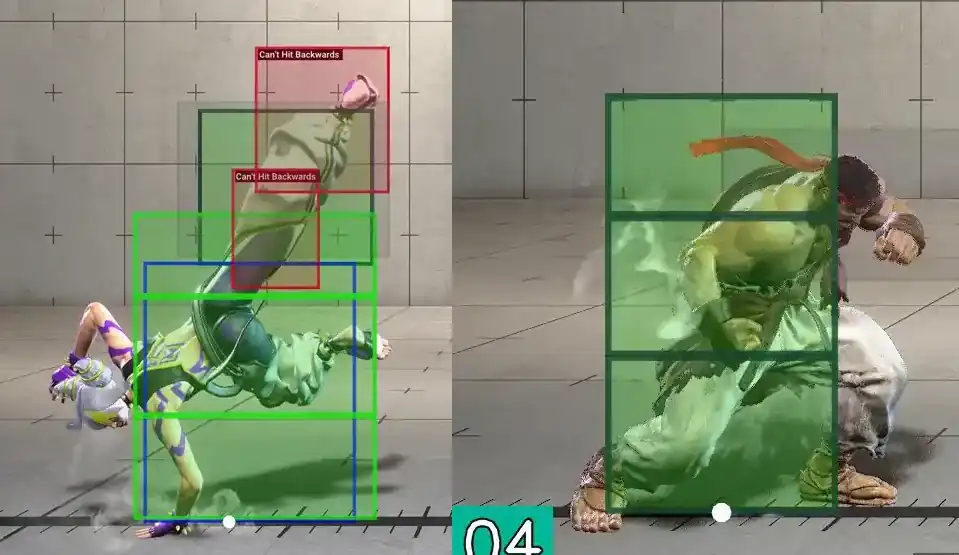
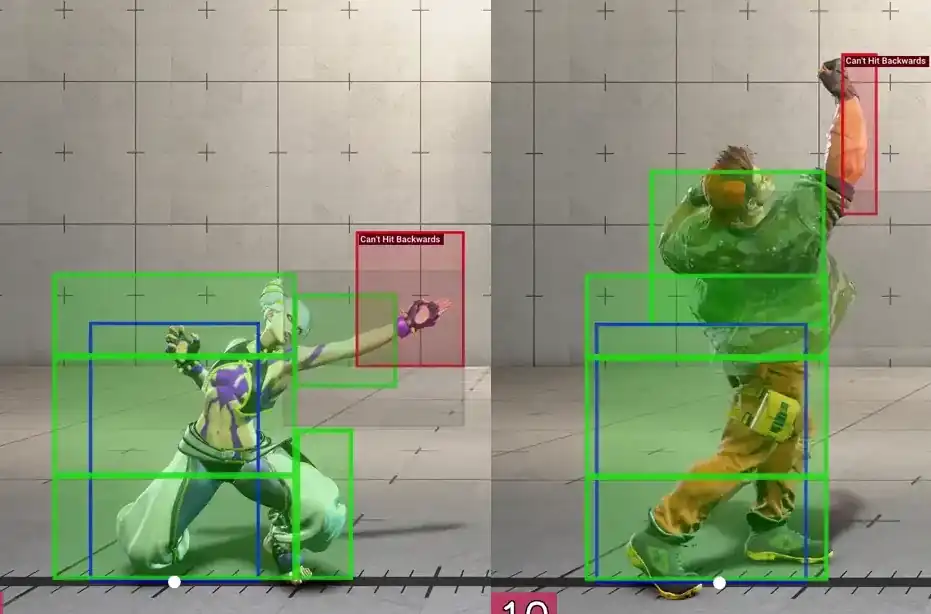
- Some normals can anti air effectively even without air strike invulns. These normals usually are very disjoint (large portion of hitbox not contained in a hurtbox)
- Example of disjoints: Juri's crouching medium punch, Luke's crouching heavy punch, shown below.
- Note that Akuma's air fireball is considered an air strike (August 2025).
❖ ❖ ❖
Purple: Armor / counter boxes.
(アーマー,カウンター技判定 / 霸体,當身)
- These boxes can absorb an attack. Some triggers a counter attack when a hitbox comes in contact with
them.- Examples: Marisa's Scutum, Zangief's charged standing heavy punch, shown below.
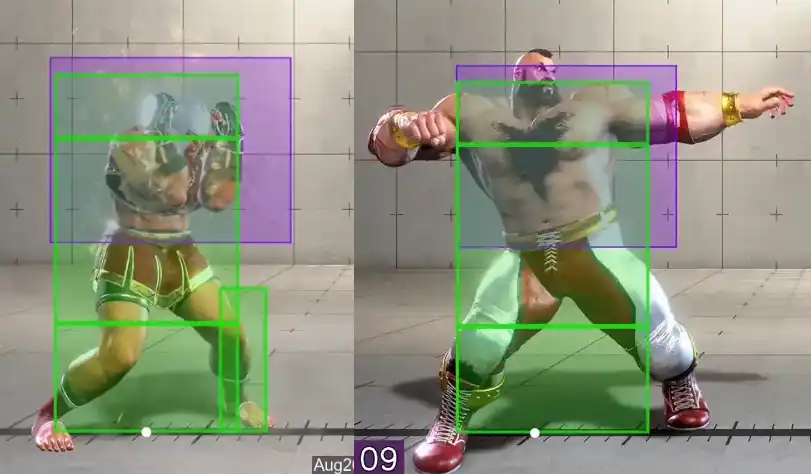
- Only the purple area absorbs / triggers an attack. Try using a normal that avoids the purple box to defeat the armor / counter if possible.
❖ ❖ ❖
White border: Ground strike invulnerable boxes.
(地面打擊無敵)
- It may be less confusing to call these "only vulnerable to air strikes".- These are uncommon boxes, used mostly as extra hurtboxes on top of normal crouching hurtbox, usually on crouching punches.
- Example: Guile's crouching medium punch, Luke's crouching medium punch, shown below.
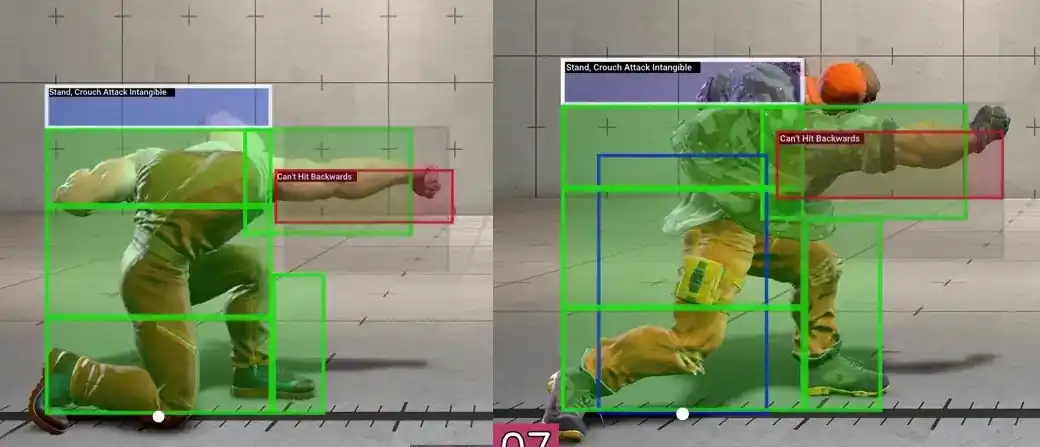
- They enlarge a crouching character's hurtbox upwards.
- This increases the chances of the crouching normal being hit by an opponent's jump in attack, thus lowering the chance of a crouching button beating or trading with a jump in attack.
- Since the purpose is to weaken the buttons against air strikes only, these extra boxes are given ground strike invuln.
- Used by capcom to adjust the interaction of crouching buttons to jump in attacks only.
- These hurtboxes are usually removed immediately after the crouching button's active frames ends. Once the active frames are gone, there is no longer any threat of these buttons trading with a jump in, and these extra hurtboxes are no longer needed.

- With the introduction of Sagat, most (if not all) of these boxes also received a projectile invulnerable (blue fill) property, so the crouching buttons will interact properly (read: duck under) high tiger shot.
❖ ❖ ❖
White border, shaded white: (Ground and air) Strike invulnerable boxes.
(打擊無敵)
- These boxes are common on startup of some Super Arts.- They are vulnerable to projectiles.
- Examples: Blanka's SA1 and Ken's SA1, shown below.
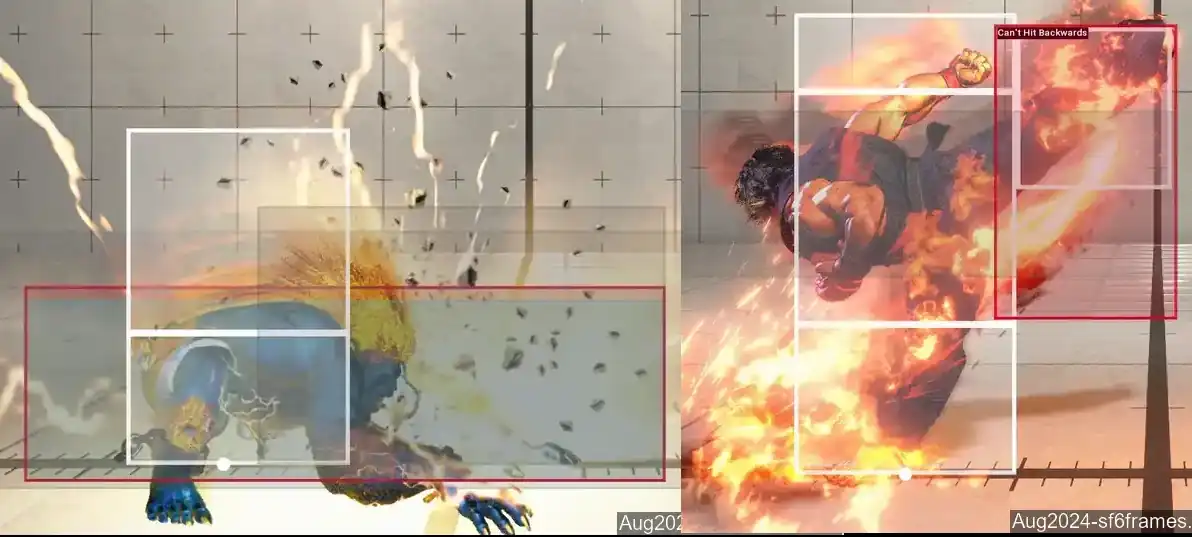
- Also commonly found as an "extra" hurtbox 1 frame before active frames of long reaching buttons that triggers crumple / staggering state / etc.
- Examples: Deejay's standing heavy kick, JP standing haavy punch, Juri standing heavy kick, Ken standing heavy kick, shown below.

- These boxes are vulnerable to projectile and will prevent the normal from progressing to its active frames when an active projectile is between the players.
- Purpose is to prevent these normals from trading with an opponent's projectile move in close ranges or during the projectile's early active frames. Such a trade would result in crumple / juggle state and possible followup damage to the player throwing the projectile.
- By making these extra addon boxes strike invulnerable, they are an effective mean of fine tuning a normal's interaction with projectiles without affecting its interaction with other normals in the game.
❖ ❖ ❖
Lack of any hurtbox on character model: Complete invincibility.
(完全無敵)
- The best type of hurtbox (for you the player) is one that doesn't exist at all. - Example: Chun-li's SA2, Juri's SA3, shown below.
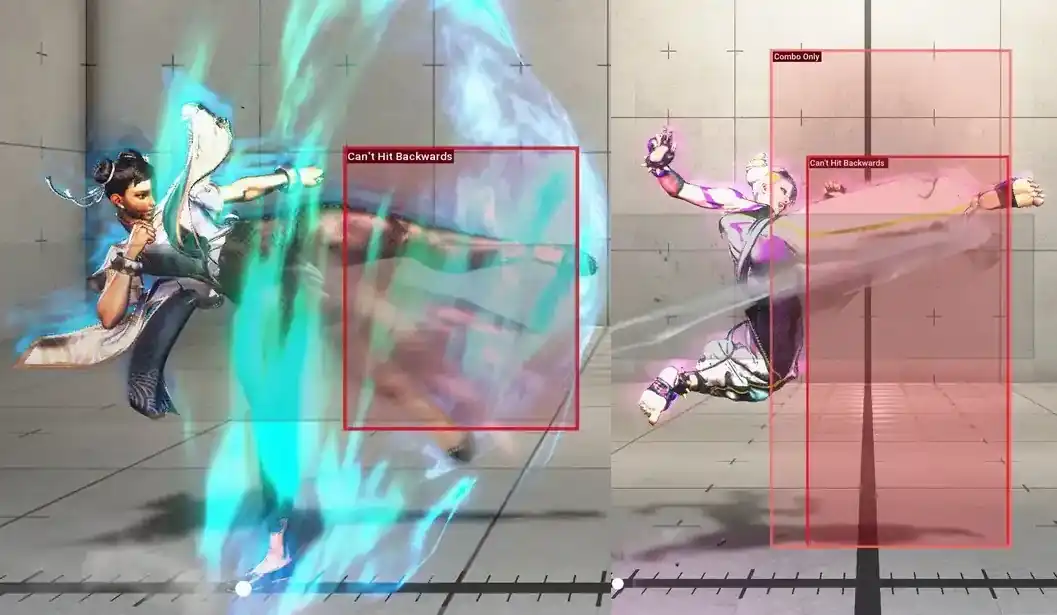
- Also commonly "found" on OD invincible reversals (Shoto OD Shoryuken, Chunli OD Upkick) and Super Arts.
❖ ❖ ❖
Grey: Proximity guard / block range.
(影縫)
- Faint gray boxes that usually appears soon after button is pressed.- The proximity guard range varies, usually depending on the the range of the actual attack, as shown in the animation below.
- Note: these moves do not have the same frame data. They are frame 1, 2, and the first active frames of each button, assembled together for easy comparison of the length of each proximity box to the first active hitbox. Please pay attention to the frame display on the bottom left of each square.

- These are ranges where an opponent will be unable to walk back - they will be forced into guard animation even if the attack whiffs.
❖ ❖ ❖
Combination boxes.
- Sometimes hurtboxes on a character has mixed properties.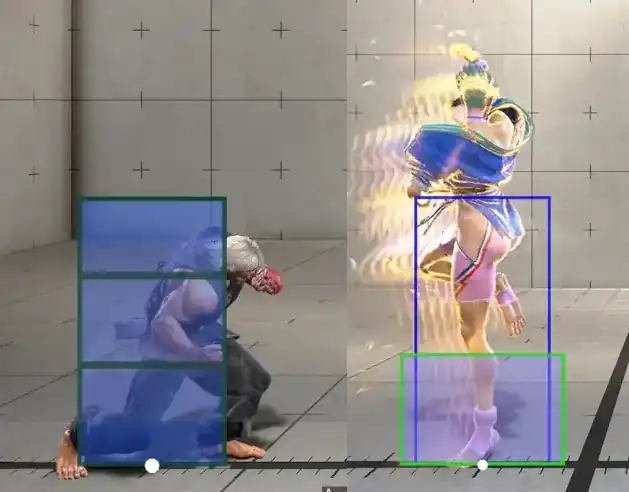
- Ken: Air invuln (dark green outline) with projectile invuln (blue filled) on Hp Shoryuken.
- Manon: Projectile invuln on lower hurtbox, with complete invincibility above knees on OD Renversé.
❖ ❖ ❖
Light red / dark pink: Combo only hitbox.
(連段受擊判定)
- These boxes only interacts with an opponent that is already being hit (eg: in the middle of a combo)- Examples where they are easy to see: JP's OD Stribog, Luke's Super Art 2, shown below.
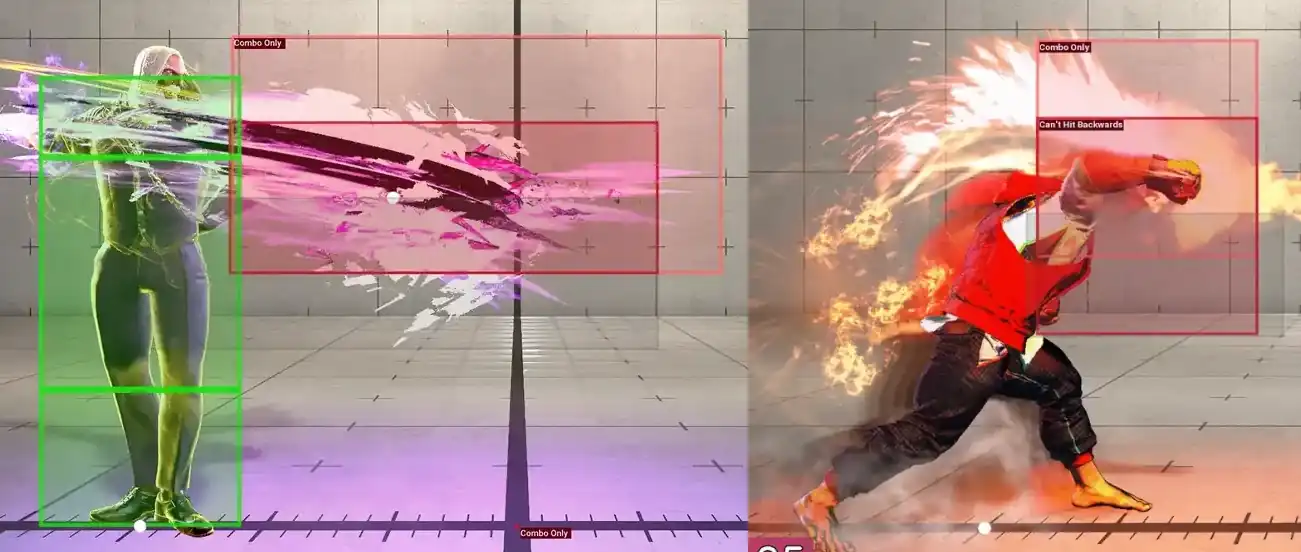
- They usually extend outside the edges of the regular hitbox.
- Their purpose is to help ensure the move will connect in a combo, where an opponent may be mid air / higher up / further away than an ordinary grounded opponent.
- A separate box that fine tunes the interaction with an opponent in the middle of a combo without making the hitbox excessively large during normal gameplay.
❖ ❖ ❖
Pink: (Command) throw hitbox.
(投げ判定 / 投技判定)
- Range at which a grounded opponent's throw hurtbox will be caught in the command throw.- Examples: Honda's Oicho Throw, Zangief's Screw Piledriver, shown below.
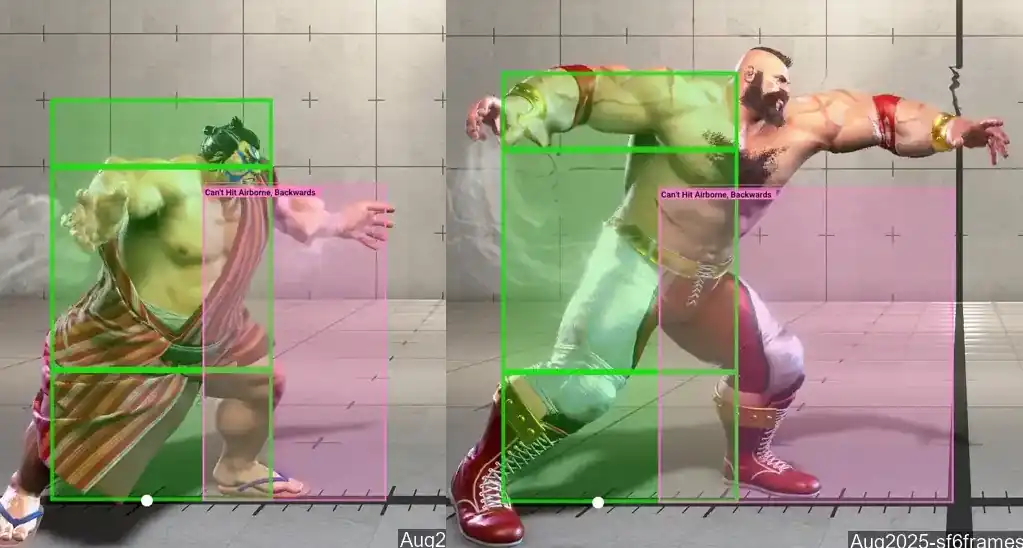
- "Command" in brackets because normal throws are not included at the moment.
❖ ❖ ❖
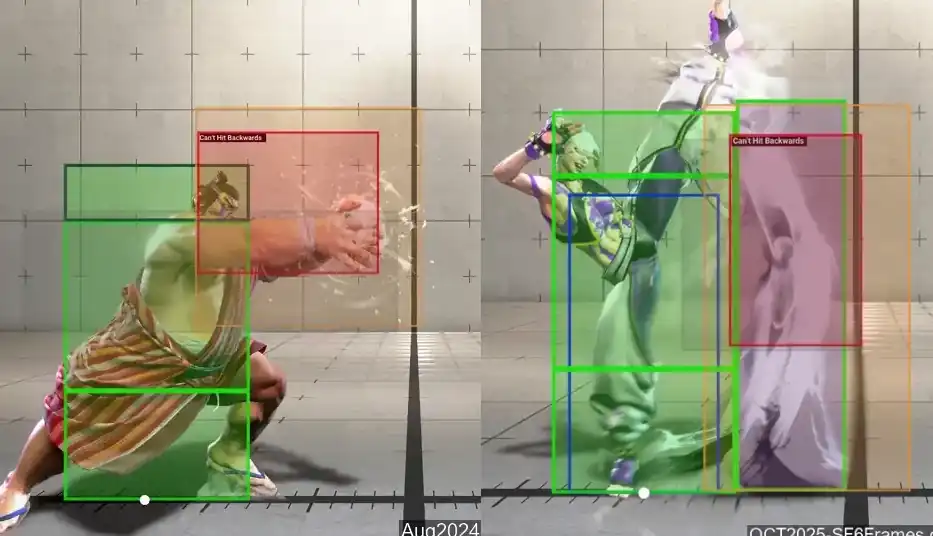
(Light) Orange: Projectile clash box.
(飛行道具相殺判定)
- A projectile that comes in contact with a projectile clash box will have 1 hit (or more, depending on the
move) removed / cancelled out.- Examples: Honda's Neko Damashi, Juri's Fuhajin, shown below.
Frame number display color guide:

|
Counter state frame |
|---|---|

|
Hitbox active frame |

|
Projectile active frame |

|
Armor / counter active frame |

|
Punish counter state frame |

|
Full invincibility frame |

|
Projectile Invincibility frame |

|
Strike / Throw Invincibility frame |
All frame data are read from the in-game frame display in training mode. This means the values will not always align with values on other frame data websites.
For example (August 2025), Chun-li's Serenity Stream > Orchid Palm (stance > lp) is listed here with a
startup of 19F.
This 19F includes the startup of the Serenity Stream and is not the startup of just Orchid Palm.
On other frame data websites, Orchid Palm may be listed to have a startup of 5F.
Frames before the first active / projectile active frame are considered the startup frames.
Frames after the last active / projectile active frame are considered recovery frames.
Some moves have extra recovery frames on whiff (vs on hit).
For Normals and Uniques moves, the frame data listed is for the move on hit/block (same way as they are
listed on Capcom's official frame data).
For Special moves, the frame data listed is for the moves on whiff, as shown in the animations.
On hit / on block values and invinciblity / armor notes are taken from Capcom Street Fighter 6 website's frame data tables.
These numbers are assuming your attack make contact with your opponent on the first active frame of your move. In the case of a projectile, when it make contact with your opponent point blank.For detailed frame data, including numbers that you might not even know exists, we recommend Frame Assist Tool (FAT).
Frequently Asked Questions
"Why are animations for some moves not included?"
- Moves that cannot be whiffed are not included. Eg: Sagat Jinrai follow ups. Most character's TCs.
- My current view is that if your only interaction with a move is to block or get hit, the location of the hitbox / hurtbox are mostly irrelevant.
- Another part of the reason is that some pages (mostly special moves pages) are already very large and graphic intensive. Performance / storage space are both potential issues.
- I may include frame data for these moves without graphics in the future, or possibly animation without frame by frame view.
- I made proximity guard boxes a very faint gray to ensure they do not interfere with readability of other boxes. Proximity guard boxes do not go away during the move and linger in the animation, sometimes overlapping other boxes.
- Proximity guard boxes are usually one very straight forward box that appears before hitboxes and often do not change. When a user is viewing a move frame by frame using browsers on desktop / mobile, they seem clear enough when shifting back and forth between frames (may also depend on your monitor color/brightness settings).
- What I did not consider was the faint gray can be difficult to see for a viewer when the website is used by a streamer or in a youtube video.
- To "fix" this issue I would have to redo all animation recordings and you can probably see why this is a very undesirable solution for me.
- Biggest reason is that Capcom's Street Fighter 6 pages only have move names in Japanese and English.
- Japanese page was created using Japanese move names from the official Capcom frame data page for ease of use for Japanese users.
- I have no way of accurately translating move names for all characters into other languages.
- I am using the Hitbox Viewer mod created by WistfulHopes for SF6, with some minor edits.
- The mod is written by a third party (unrelated to Capcom) and cannot be used on console versions of the game.
- I am not comfortable with directly linking / recommending people to install the mod - please use the mod at your own discretion. If you are interested in using the mod, a simple google search for "WistfuLHopes Hitbox Viewer" should help you locate the mod.
- Very casual, very inactive """Master""".
- As such I may not be the most up-to-date on changes. See an error, or know something I don't? Please let me know so I can correct it.